Also in this issue · Personal project · Sep 2026

Turning 138 cryptic clues into my personal learning dashboard

Cryptic Clue Log Analytics: a personal stats dashboard for Minute Cryptic. I collected my own solving history, tagged every clue by technique, and compared my times with everyone else's.

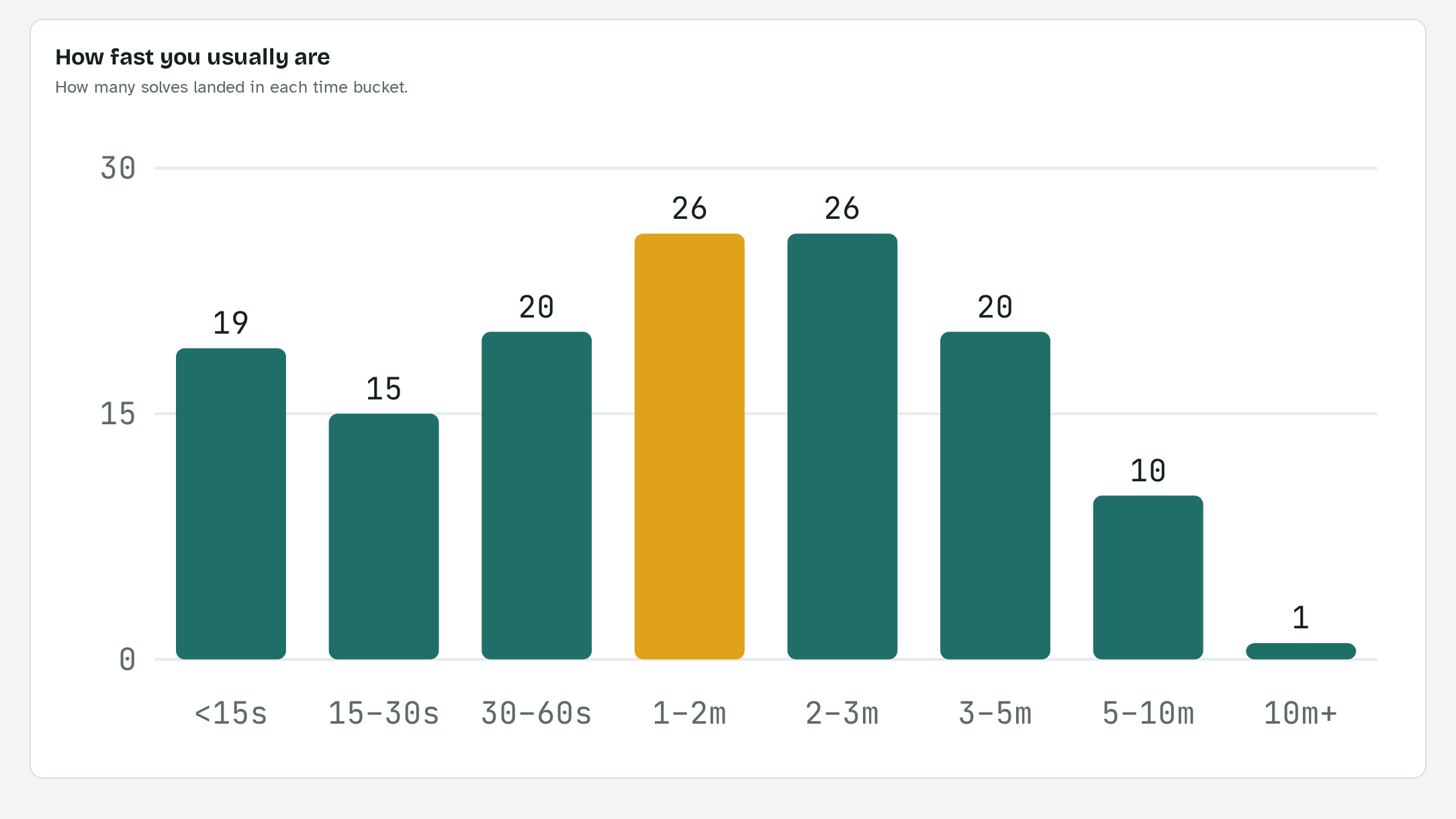
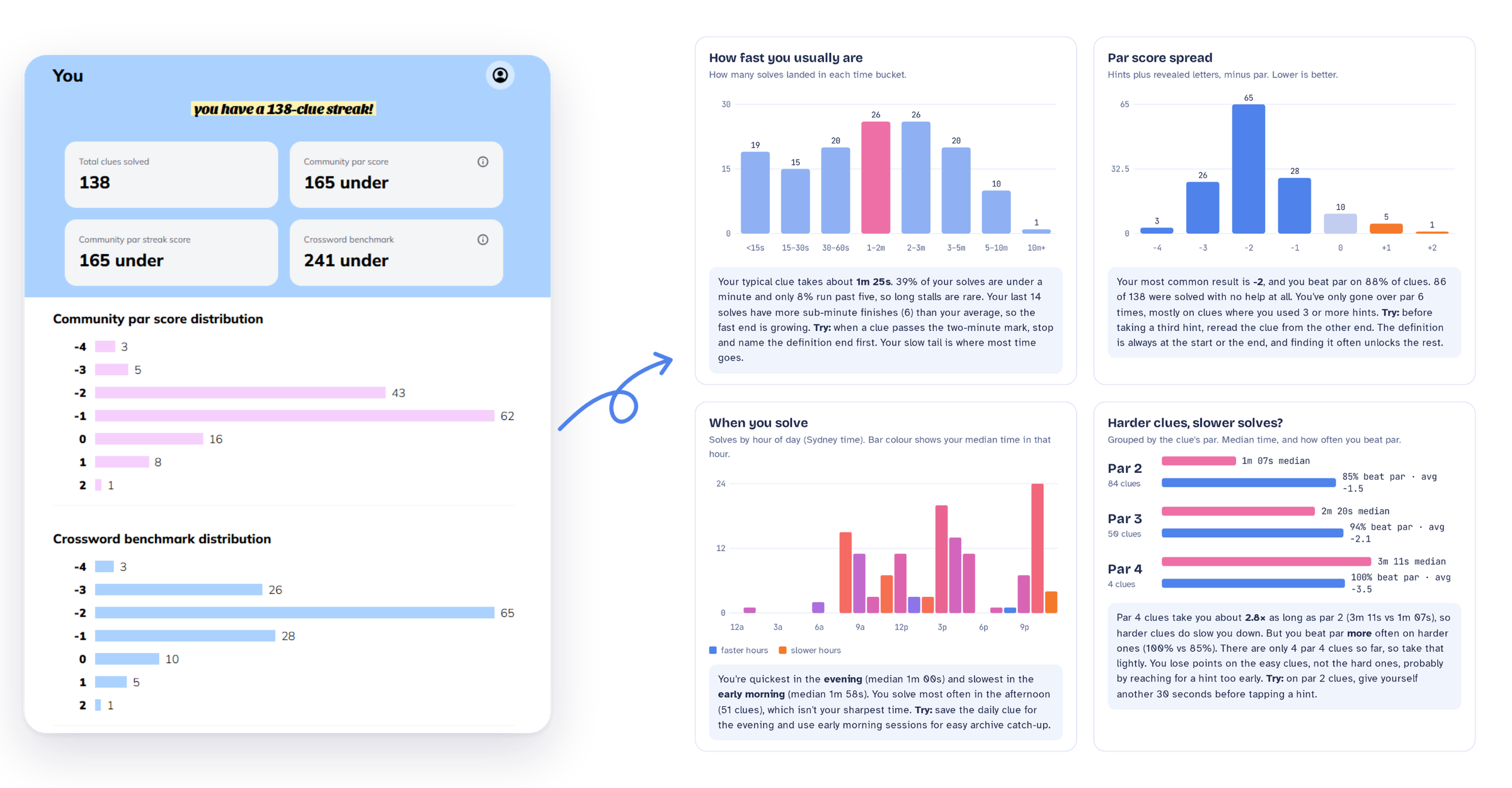
See the live demo →Minute Cryptic's own stats page, showing totals and score distributions, with an arrow pointing to four panels from my dashboard: solve-time histogram, par score spread, time of day, and harder clues vs slower solves, each with a plain-language insight.
Credits
Role
Designer: data, visual design, copy and front end
Tools
Claude · Figma · my Minute Cryptic account data · HTML, CSS & JS
Timeline
Sep 2026 · about 2.5 to 3 hours
Data
138 daily clues · community stats from 30 Jul 2026
In short

The app tells you how far under par you finished. I wanted to understand how I was learning.

I'm a big fan of Minute Cryptic, a website that posts one cryptic clue a day. I wanted to know how fast I solve, what time of day I'm sharpest, which clue techniques trip me up, and whether I'm actually improving. So I built my own analytics dashboard with Claude, from finding my data to designing the final UI in Figma.

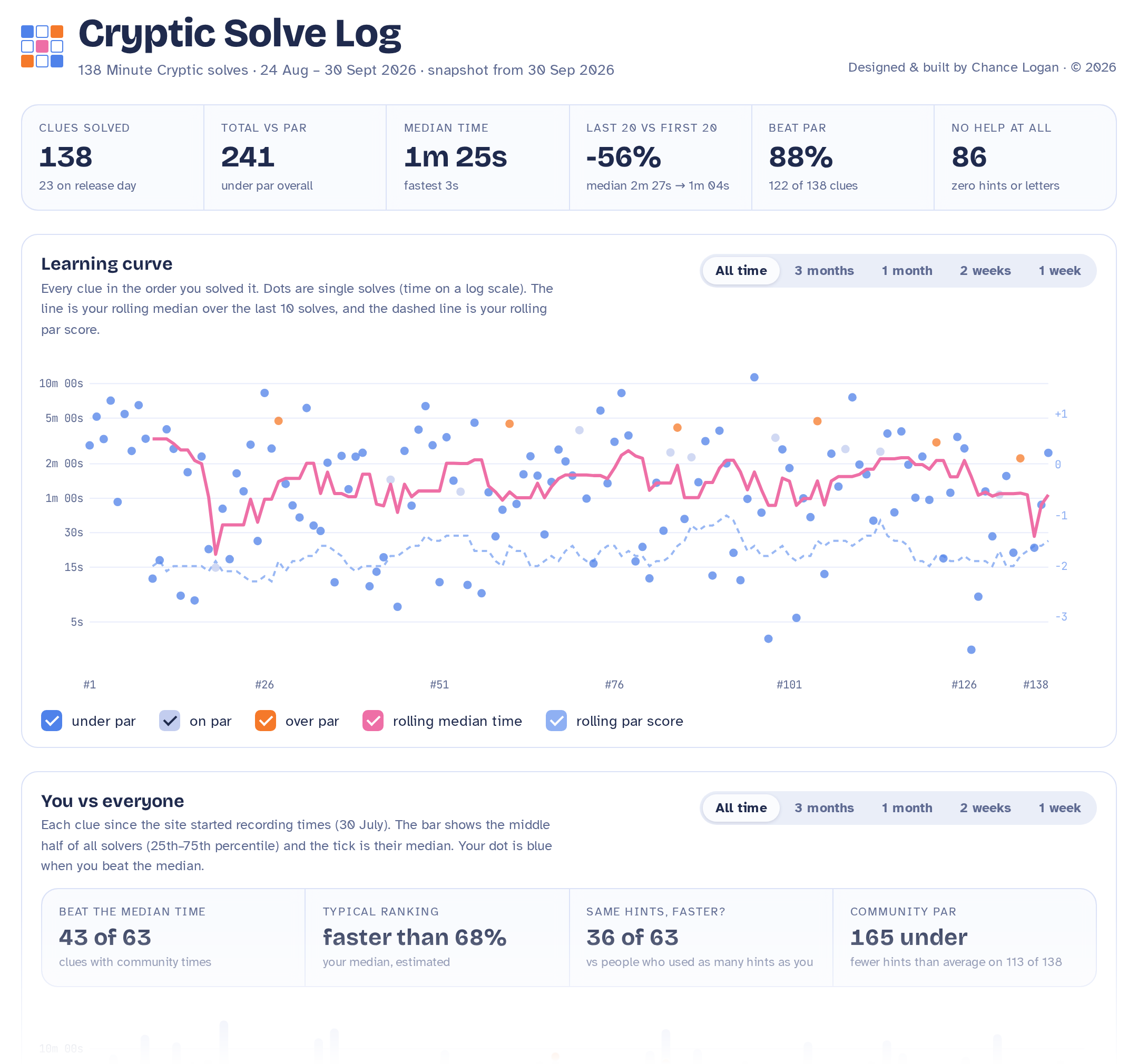
The result: 138 days of solves, every clue tagged by technique, and my times compared with the community's.

56%
faster: my median solve dropped from 2m 27s to 1m 04s
88%
under par, with 86 clues solved without hints or revealed letters
42s
median for hidden words, my fastest; charades are slowest at 5m 50s
1m00
evening median: I'm a night owl, and slowest in the early morning
The Cryptic Solve Log dashboard: headline stats (138 clues solved, 241 under par, 1m 25s median, 56% faster, 88% beat par, 86 with no help), a learning curve of every solve with a rolling median, and a You vs everyone comparison.
01
The problem

The app tells me if I won today. Not if I'm getting better.

Minute Cryptic is an online cryptic crossword site that publishes one cryptic clue a day. It was co-founded by Angas Tiernan and Liam Runnalls, (Liam also writes for The Age). Each clue comes with hints you can use, and a par: the number of hints and revealed letters the community typically needs.

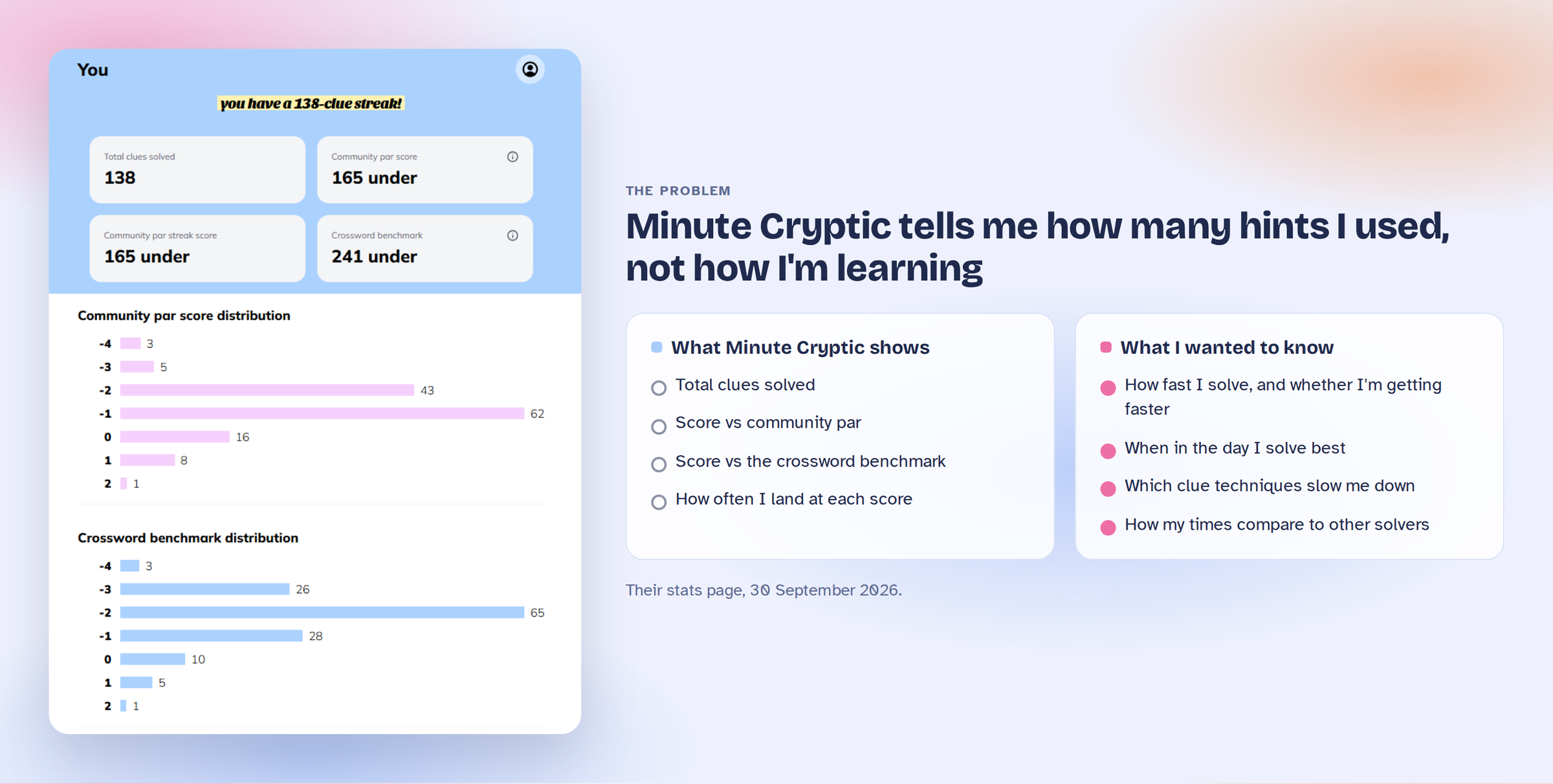
The app tells me my streak, my time for that clue, and whether I beat today's par. It doesn't tell me whether I'm getting faster, which kinds of clues confuse me, or how I compare with everyone else.

Minute Cryptic's stats page next to two lists. What it shows: total clues solved, score vs community par, score vs the crossword benchmark, and how often I land at each score. What I wanted to know: how fast I solve and whether I'm getting faster, when in the day I solve best, which clue techniques slow me down, and how my times compare to other solvers.

What Minute Cryptic shows me today, and the questions it leaves open

02
Background

A linguist, a dad and a five-letter minimum

I love crosswords and puzzles, and they're some of my fondest childhood memories. I think my dad is a trivia and crossword genius; at one point I was convinced he had unlimited knowledge. I grew up in Melbourne, where we had The Age. I remember flicking through the Green Guide and highlighting what I wanted Dad to record, and doing the daily Age quiz together over dinner.

no mercy for eight-year-olds

I was lucky to have the kind of family where game and puzzle nights were a regular thing. We played Word Factory (a bit like Boggle), and unfortunately for me, being eight years old didn't matter. Most of the time I played at the same level as everyone else, with a five-letter minimum.

The funny thing was that Dad, despite his endless knowledge, never did cryptic crosswords. When I asked him why, he said they were too difficult and that they needed a different, more abstract kind of brain work. Of course, I was immediately curious. I saw a golden opportunity to be better than everyone else at something.

So I tried one, and... failed epically.

Many years later, as an adult, I discovered Minute Cryptic. To my delight, it was run by Australians, one of them even an Age cryptic crossword writer, with features from other Age writers!

Cryptic clues are a language puzzle. Every clue hides a definition plus some wordplay: an anagram, a hidden word, a container, a charade. As a linguist-turned-designer, I wanted to see which of those tricks my brain handles well, and which ones still slow me down.
03
Process

138 clues, and no intention of typing them in by hand

I had 138 past clues and no intention of typing them in by hand. Because the minute cryptic app syncs to my membership, I figured I could compile my own solve history from my account instead. AI-assisted workflow to the rescue.

I had some experience inspecting data sources, but I didn't know where to look or how to export anything useful. So I turned to Claude, and it became my first AI project.

Finding the data

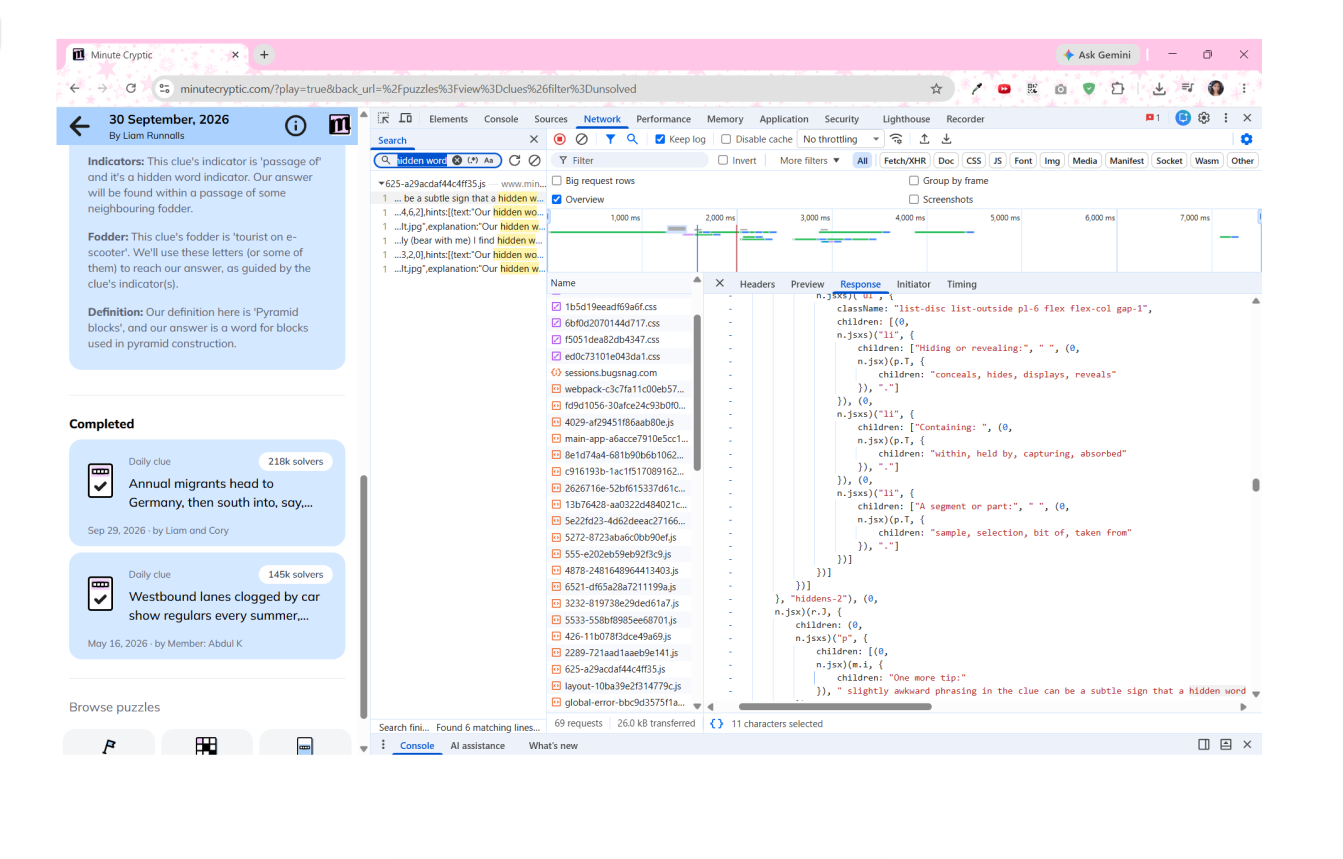
Finding the data was the hardest part. I opened my browser's developer tools, screenshotted what I could see in the console and network requests, and sent it to Claude. Claude pointed me to the right requests and explained what each one was, until we worked out that my clue solving history lived in the app's hosted database (Supabase).

I had to ask Claude where anything was

One of the console screenshots I sent Claude, asking where my data actually lived

Sketching & iterating Claude's initial design

a key example of how AI can follow some key heuristics, but lacked an understanding of human joy

The first version of the design had no filters and an ugly green and red colour combo. I understood that Claude intended for it be easily recognisable and green is good and red is bad, but it was displeasing.

I often sent sketched lo-fi to mid-fi diagrams to speed up the feedback iterations, paired with specific prompts, like moving the time filter out of the top-right corner and into the chart header for a more minimal look.

Rather than describing layouts in words, I worked them out on a Figma board first: the page structure, the clue pop-up and the findings callouts. A screenshot of a sketch said more than a paragraph of prompt ever could.

Figma board with mid-fi sketches of the Cryptic Solve Log: the page layout with stats, learning curve and technique charts, a clue pop-up showing technique tags and solve stats, and findings callouts.

My Figma board of mid-fi sketches, which I screenshotted to prompt Claude

04
Key decisions

Colour, legend and time filters

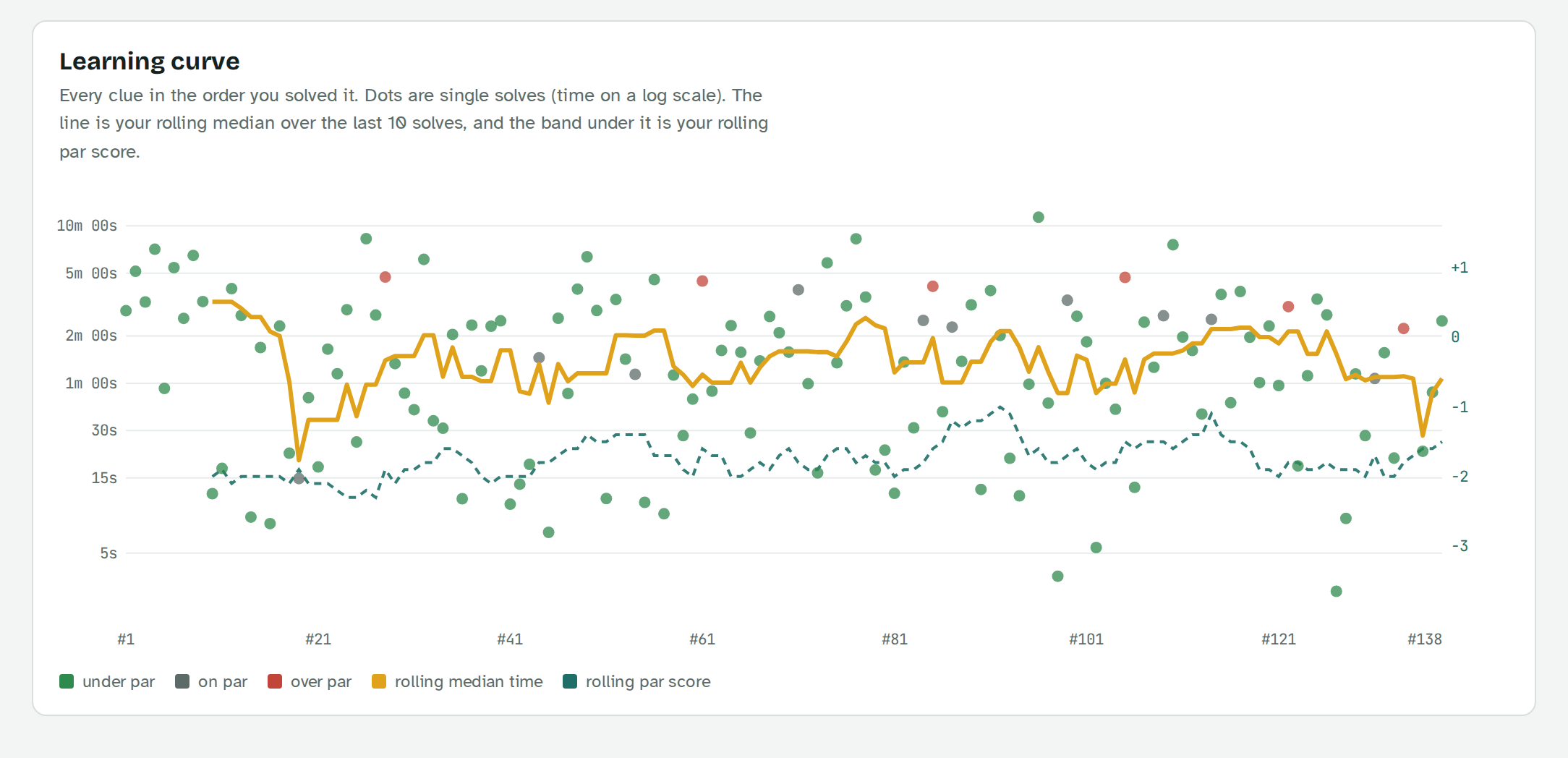
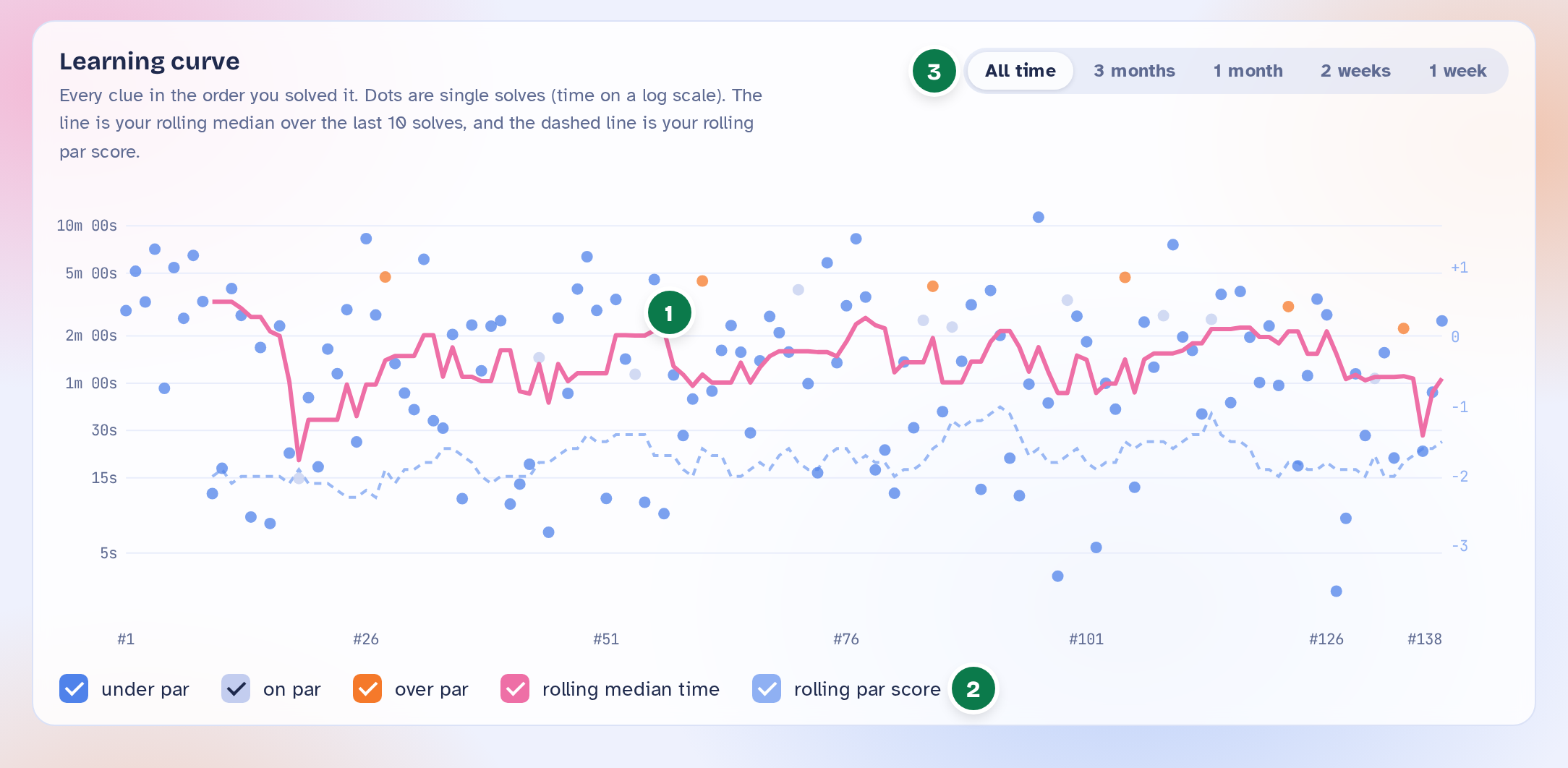
I swapped the original green palette for a brighter blue, orange and pink, turned each legend swatch into its own checkbox, and put the time filters (all time, 3 months, 1 month, 2 weeks, 1 week) right next to each chart title. Fewer borders, fewer controls, same power.

Before

First version of the learning curve chart in green and gold, with a static legend and no filters.
  • Colours were uninspiring

  • The graph was hard to read because you couldn't filter it

  • Couldn't filter by date

After

Redesigned learning curve in blue, pink and orange, with checkbox legend items and time filters from all time to 1 week. Numbered markers 1 to 3 match the notes below.

1Colours are cuter and more personal

2The legend doubles as checkboxes, so the graph can be filtered

3Filter by time period

Insights, not just charts

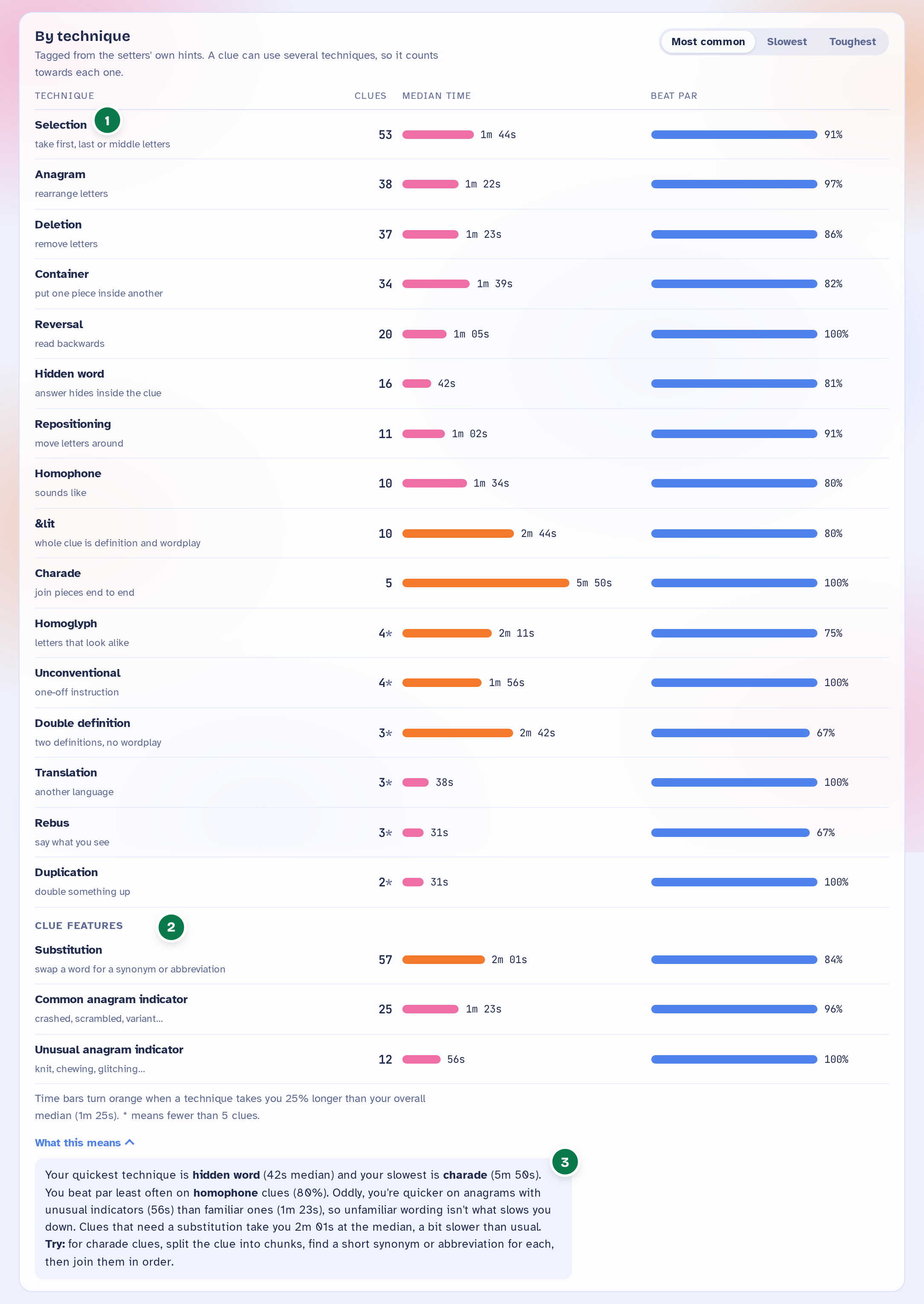
Charts alone left me guessing what they meant. Each panel now has a short “What this means” note, and there's a new breakdown by clue technique. Every insight is written from the actual data, so it never claims more than the numbers show.

Before

First version of the solve time histogram, a chart with no explanation.
  • Charts with no explanation

  • No way to see which kinds of clues slowed me down

After

By technique panel listing clue types such as hidden word, anagram and charade with median times and par scores, plus a What this means insight. Numbered markers 1 to 3 match the notes below.

1Techniques tagged from the setters’ hints

2Clue features, like common vs unusual indicators

3Plain-language insight with a tip to try

Sorting the solve log

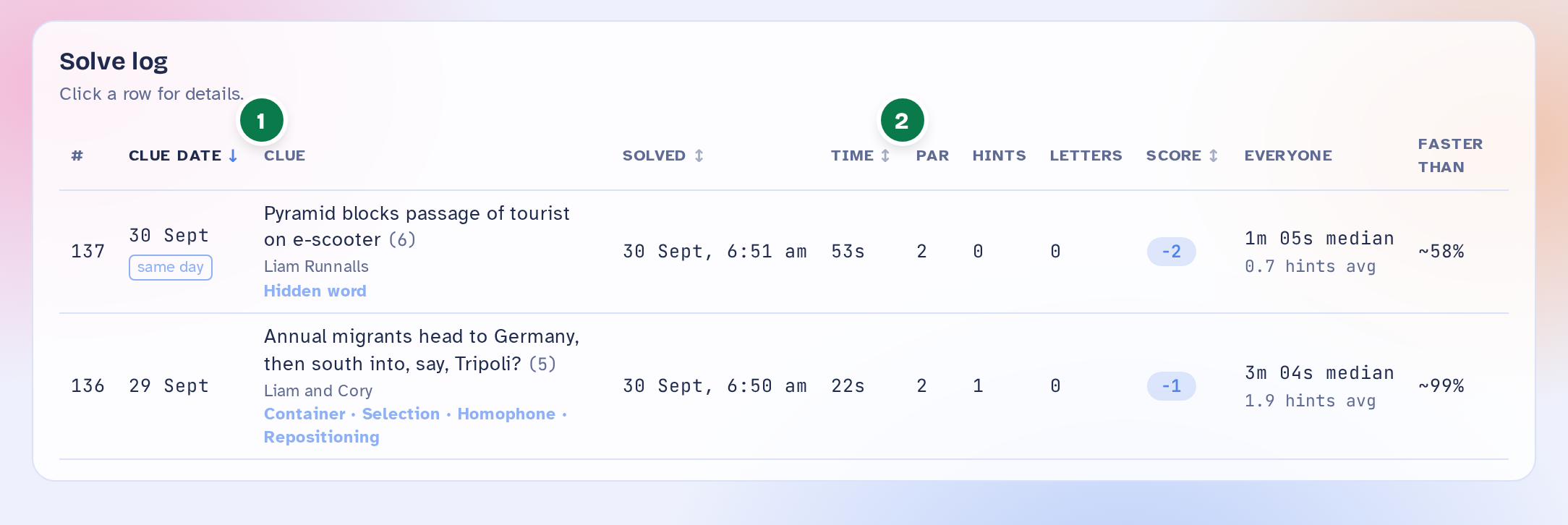
I first tried a row of sort pills above the table. They added clutter, so I moved sorting into the column headers: clue date, solved, time and score, with simple arrows and clue date as the default.

Before

Earlier solve log with a row of sort pill buttons above the table.
  • A row of sort pills added clutter above the table

After

Redesigned solve log with sortable column headers showing arrows. Numbered markers 1 and 2 match the notes below.

1The active sort shows its direction

2Other sortable columns show ↕

Protecting paid content

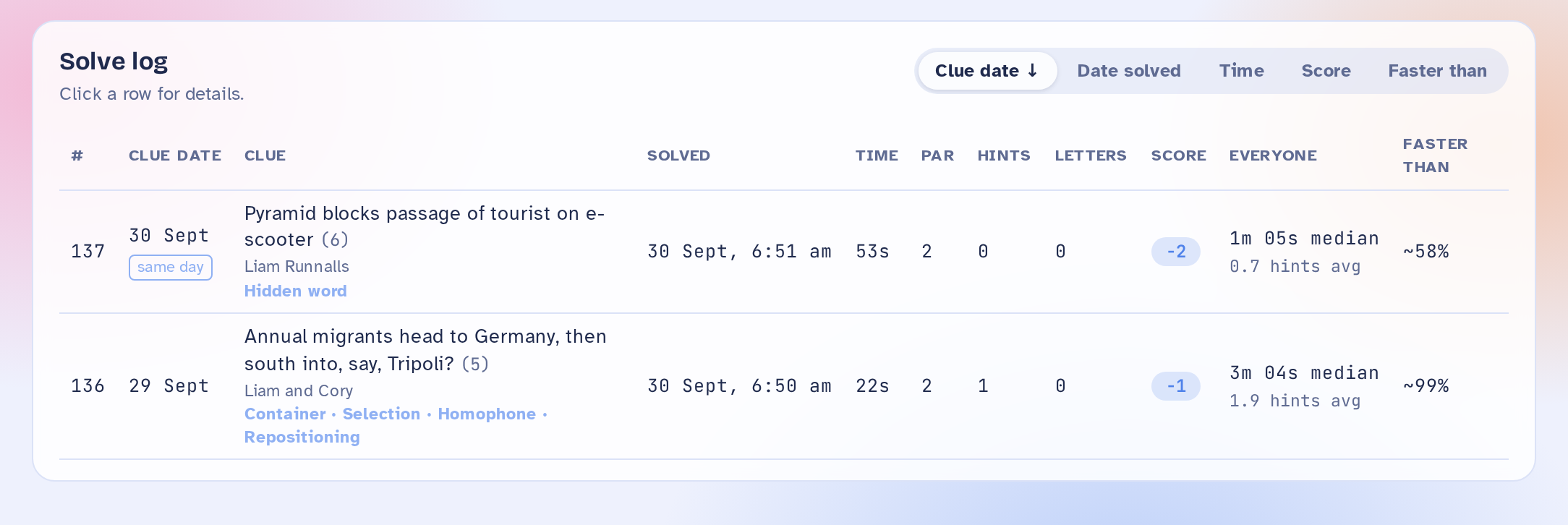
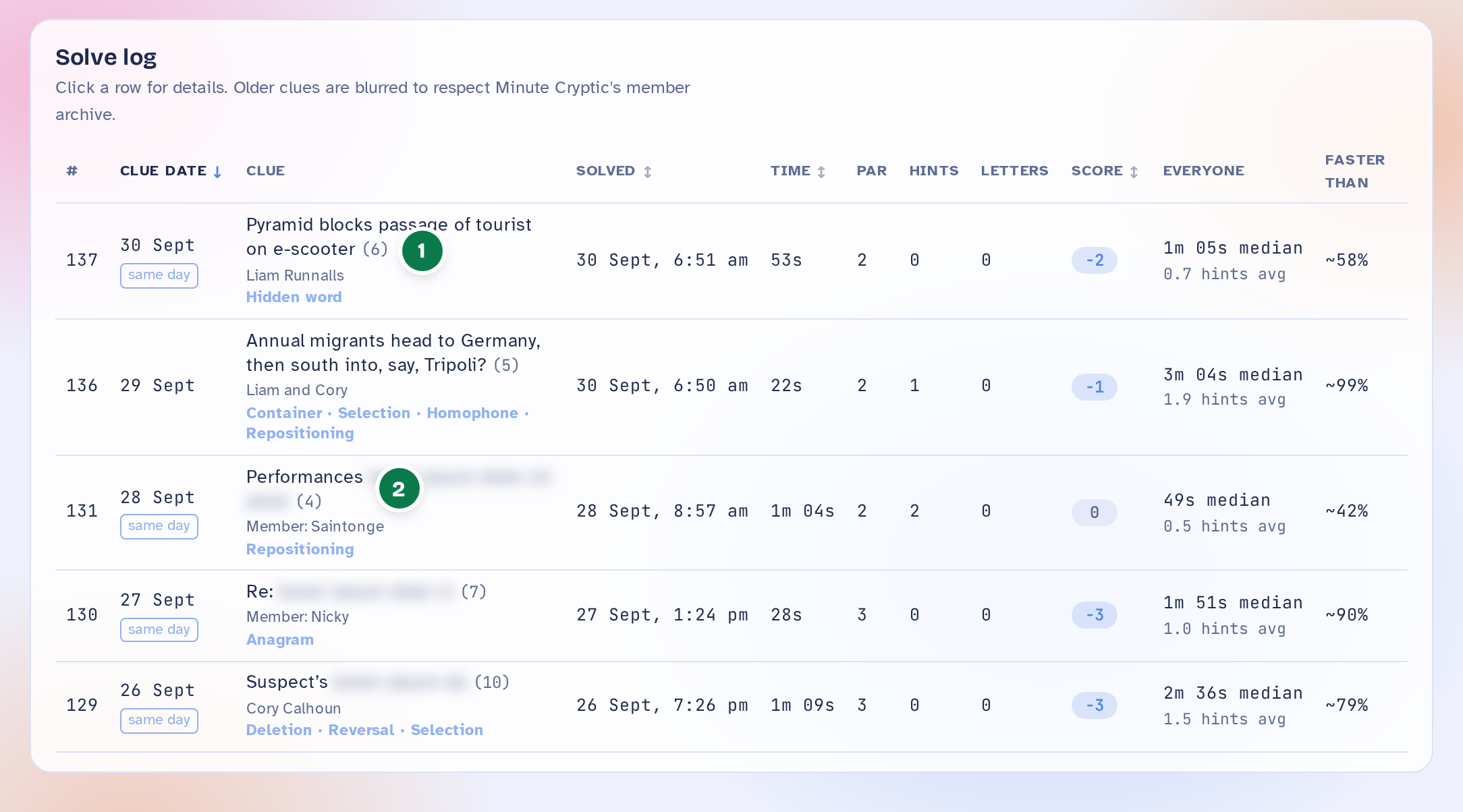
Minute Cryptic's archive is part of its paid membership, and I didn't want my portfolio to give it away. The public demo shows only the two most recent clues in full; older clues are blurred, and hints and answers are removed entirely.

Portfolio version

Portfolio version of the solve log: the two latest clues are shown in full, older clue text is blurred. Numbered markers 1 and 2 match the notes below.

1The two latest clues show in full, as they do for free on Minute Cryptic

2Older member-archive clues show only their first word

05
Reflection

My first AI-assisted project!!

The primary aims of this project was to learn about how AI can be embedded into my workflow. I aimed to explore the extent of Claude's capabilities, and see how it would help ideate solutions when given constraints and goals. This was pure fun, starting as a question about my own daily habits and turned into a small end-to-end product: data, visual design, copy and front end, all in an afternoon.

My main takeaway was being impressed with how Claude can read and interpret bulk instructions, and address every problem. If this was a professional project, I imagine my design flow would look very similar to this:

  1. 01Write down the real constraints, pain points, human goals and the gap from A to B
  2. 02Create first mock-ups with Figma Make or Claude Design
  3. 03Hand it to developers, instead of me scrambling through the inspect terminal
  4. 04Demonstrate the functionality with placeholder data
  5. 05Developers start the build while I improve the UI alongside

It's really good for lowering some of the initial development barriers I otherwise would've hesitated on, such as "how do I get the data from the website"

Finally, Claude assisted me as a designer with little coding background, to look out for certain design structures & & choices to acknowledge how things are actually built, such as considering optimisation problems. This saves a developer from having to answer a million questions from me.

06
Future work

Keep the learning curve growing

Right now the dashboard is a snapshot from 30 September 2026. Next, I'd like a small userscript that updates it after each solve, so the learning curve keeps growing without any manual steps.